Web Development Roadmap 2026: Complete Beginner to Job Ready Guide
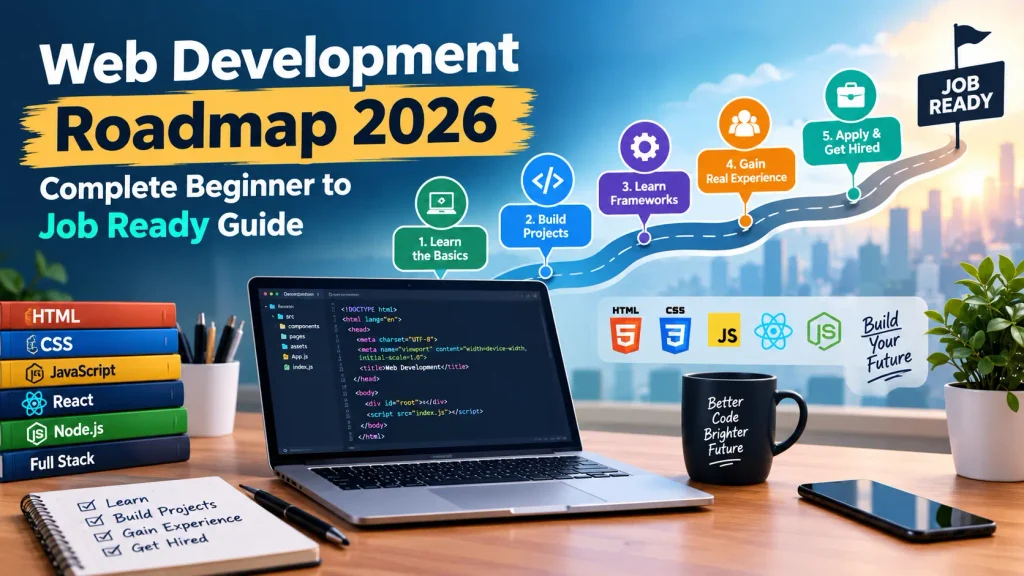
Web Development Roadmap 2026: Complete Beginner to Job Ready Guide. Learning web development in 2026 is confusing . There are so many new frameworks, AI tools are revolutionizing coding and everyone has a different opinion on which language or framework to learn first. The truth is, becoming a web developer isn’t about learning every new technology . It’s about learning the right skills in the right order.
This web development roadmap deconstructs what you need to learn, when you should learn it and how to avoid the traps that trip up most developers . If you’re changing careers and creating a side project or you’re just curious about what it takes to make websites that then you’re in the right place.
Why Most Beginners Fail (And How to Avoid It)
Time to get into the nitty gritty. Before we do, let’s just hit the elephant in the room. That is the biggest mistake people new to this game make they learn too much too quickly . They try to learn HTML, Python, React, Angular, etc in the same week or month and lose their mind.
Effective developers who succeed have a different story. They isolate their attention to reinforce their learning by putting things into practice and are fully aware they’ll never know it all . Even experienced developers reach out to Google documentation and AI when they need to find something specific.
It’s not about learning every CSS property or JavaScript method you need . It’s about having the foundation , knowing how to solve problems and gaining the confidence to figure things out along the way.
Phase 1: The Foundations (Months 1–2)
All web developers, no matter what they do, begin with the same three skills . If you pass up these things will be hard later.
HTML: The Structure of the Web
HTML (Hyper Text Markup Language) is the language of every website you’ve visited so far . Don’t waste months trying to learn all the HTML tags . Just learn what you need :
- Semantic elements :
<header>,<nav>,<main>,<article>,<footer>and<section> - Text content : Headings, paragraphs, lists and links
- Media : Images, video, and audio elements
- Forms : Input fields, buttons and labels
- Tables : When you genuinely need tabular data
Build a few simple pages a personal profile, a recipe page, a simple blog post to practice . The goal is comfort, not perfection.
CSS: Making It Look Good
CSS controls how your HTML looks. Modern CSS is powerful but beginners often waste months trying to learn every property. Here’s what actually matters :
- The box model : Margin, border, padding and content
- Flexbox and CSS Grid : The two layout systems you’ll use constantly
- Responsive design : Media queries and relative units
- Colors, typography and spacing : The visual fundamentals
A common trap is jumping to Tailwind CSS or Bootstrap before understanding plain CSS . These tools are useful but they make more sense once you know what they’re abstracting.
Java Script: Adding Interactivity
JavaScript is where web development gets real. It’s also where most beginners hit their first wall. Start with the fundamentals:
- Variables, data types and operators
- Functions and scope
- Arrays and objects
- DOM manipulation (selecting and changing elements)
- Events and event listeners
- Basic asynchronous concepts (promises,
async/await)
Don’t Jump to React . Create a few small projects using only vanilla JavaScript a todo list, a calculator, a very basic quiz . This will make you really understand how state and events actually function before a framework takes away that burden.
Git and GitHub: Version Control Essentials
Save early, save often. Git provides a version history of your code and encourages experimentation by allowing you to easily revert to previous versions without risk . Sign up for Git Hub and set up repositories of your code using the core commands : add, commit, push, pull and branch.
Phase 2: Modern Frontend Development (Months 3–5)
Once you’re comfortable with the fundamentals , it’s time to learn how professional frontends are built.
Pick One Framework: React
React remains the most in demand frontend library in 2026. Due and Angular are viable alternatives but React has the largest ecosystem and job market.
Learn these React concepts thoroughly:
- Components and props
- State and the
useStatehook - Effects and the
useEffecthook - Conditional rendering and lists
- Handling forms and user input
- Context API for simple state sharing
Build a project that consumes a public API a weather app, a movie search tool or a crypto price tracker . Handling loading states, errors and real data is where the learning happens.
Type Script : The Industry Standard
Type Script is Java Script that scales. Finds bugs early, makes software easier to understand and more maintainable and has become a job requirement in the majority of professional roles in frontend development.
Don’t learn TS and React at the same time. Focus on React then sprinkle in types as needed. Begin with basic interfaces then move on to generics then advanced patterns.
Styling with Tailwind CSS
Most React projects have switched to using Tailwind as the default style solution. With its utility classes that you combine in your markup, it’s a rapid way to style with consistency.
The bad news is that all your HTML gets much wordier. Some developers love it, some prefer regular CSS or CSS in JS. Give it a shot in a project and see how you feel.
Phase 3: Backend Development (Months 6–8)
Frontend developers who understand backend become significantly more valuable. You don’t need to become a backend expert but you should be able to build and connect APIs.
Web Development Roadmap 2026
Node.js lets you run JavaScript on the server . Express is the most popular framework for building web servers and APIs with Node.
Learn how to:
- Set up a basic server
- Create REST API endpoints (GET, POST, PUT, DELETE)
- Handle request bodies and query parameters
- Use middleware for logging, authentication, and error handling
- Connect to a database
Data bases : PostgreSQL and MongoDB
You need to know how to store and retrieve data. The two main categories are:
Relational databases (SQL) like PostgreSQL and MySQL store data in tables with defined relationships . They’re ideal when your data has clear structure and consistency requirements .
NoSQL databases like MongoDB store data as flexible documents . They’re useful when your data structure changes frequently or doesn’t fit neatly into tables.
Learn basic CRUD operations (Create, Read, Update, Delete) in both . Understand when to use which type of database and don’t fall into the trap of thinking one is always better than the other.
Authentication and Security
This is where hobby projects become real applications. Learn:
- Password hashing with crypt
- JSON Web Tokens (JWT) for stateless authentication
- Sessions versus tokens
- Input validation and sanitization
- Basic protection against common vulnerabilities
Never store passwords in plain text . Never trust user input . These aren’t suggestions they’re requirements.
Phase 4 : Full Stack Integration and Deployment (Months 9–10)
Connecting Frontend to Backend
Build a complete application where your React frontend talks to your Express backend which talks to your database . Handle authentication, protected routes and data persistence.
A common project at this stage is a task management app or a simple social platform . The specific idea matters less than the skills you practice : making fetch or axios calls , managing loading and error states and handling authentication tokens.
Deployment: Getting Your Work Online
An application on your laptop isn’t a portfolio piece. It needs a public URL.
Learn to deploy:
- Frontend : Vercel, Netlify or Cloud flare Pages
- Backend : Railway, Render or a VPS
- Databases : Managed services like Supa base, Neon or MongoDB Atlas
Use environment variables for secrets . Never commit API keys or database credentials to GitHub.
Testing Basics
You don’t need to become a testing expert but you should know how to write basic tests. Learn:
- Unit tests for individual functions
- Component tests for React components
- Integration tests for API endpoints
Tools like Vitest, Jest and React Testing Library are standard. Start with simple tests and expand from there. Web Development Roadmap 2026.
Phase 5: Specialization and Job Preparation (Months 11–12+)
Build a Portfolio That Gets Notices
Three to four deployed projects are worth more than a dozen unfinished tutorials. Your portfolio should demonstrate: Web Development Roadmap 2026.
- Variety : Show different skills a CRUD app, an API integration, a responsive design
- Depth : At least one project with authentication database integration and real users
- Clean code : Consistent naming, sensible structure and a README that explains your decisions
Deploy everything. A live URL with a functioning demo is far more impressive than a GitHub repository alone. Web Development Roadmap 2026.
Learn System Design Basics
Even junior developers benefit from understanding how systems work at scale. Learn about:
- Client server architecture
- REST versus GraphQL
- Caching strategies
- Load balancing basics
- Database indexing
You won’t design distributed systems as a junior developer but understanding these concepts helps in interviews and makes you a better collaborator. Web Development Roadmap 2026.
Use AI as a Tool Not a Crutch
AI coding assistants like Git Hub Copilot and ChatGPT are now standard tools in professional development. Use them to :
- Explain confusing error messages
- Suggest approaches to problems
- Generate boilerplate code
- Review your code for potential issues
But don’t let AI replace your understanding . If you can’t explain what the code does, you don’t understand it . Developers who keep improving their skills will always have an advantage.
Also Check : On Page SEO Tips: The Complete Guide to Ranking Higher in 2026
Realistic Timelines
Learning web development takes time. Here’s a rough guide based on common learning paths:
| Milestone | Full Time (35 hrs/week) | Part Time (10 hrs/week) |
|---|---|---|
| HTML, CSS, JavaScript basics | 4–6 weeks | 3–4 months |
| React and modern frontend | 6–8 weeks | 5–6 months |
| Backend and databases | 6–8 weeks | 5–6 months |
| Full stack project | 4–6 weeks | 3–4 months |
| Job-ready portfolio | 2–3 months | 4–6 months |
These aren’t guarantees . Your background, learning method and consistency matter enormously. The single biggest factor is hours of focused practice . Studying one hour daily beats cramming eight hours on Saturday. Web Development Roadmap 2026.
Common Mistakes to Avoid
- Tutorial hell : endless videos to watch, no project to make . Projects will teach you more than tutorials ever will. Web Development Roadmap 2026.
- Framework hopping : React to Vue to Svelte to before you learn one . Depth over breadth.
- Avoiding fundamentals : Going straight to frameworks without getting your feet wet with JavaScript is akin to running before you can walk. Web Development Roadmap 2026.
- Don’t ignore the deployment : An undeployed project is an incomplete project.
- Alone learning : be part of communities, publish your work, ask for help . Developer communities are generous with their support. Web Development Roadmap 2026.
Frequently Asked Questions (FAQs)
How long does it take to become a web developer?
How Long Will It Take to Find a Job? If you are a committed learner, it is definitely possible to prepare to secure a job within 6-12 months. The two most common learning formats, full time (6-8 months to prep) and part time (12-18 months), require different periods of time to get job-ready.
Do I need a computer science degree?
Can I become a developer without a degree? Yes. There are plenty of successful developers who are self-taught or went to coding boot camps. Most jobs for web developers will want to see your portfolio rather than your credentials.
Should I learn frontend or backend first?
Beginning with frontend. The HTML, CSS and JavaScript are the fundamental ideas of programming and are usually easier to learn. Backend programming is just an extension of the basics.
Is React still worth learning in 2026?
Yes. React remains the most widely used frontend library with the largest job market. While other frameworks have their strengths, React skills are the most transferable and in demand.
How many projects do I need in my portfolio?
Three to four solid, deployed projects are typically sufficient. Quality matters more than quantity. At least one should be a full stack application with authentication.
Can I get a job with only frontend skills?
Yes, frontend developer roles exist and are common. However, understanding backend basics makes you more versatile and competitive.
Is AI going to replace web developers?
AI is changing how developers work, not eliminating the need for them. Developers who learn to use AI tools effectively will have an advantage over those who don’t.
Conclusion
Getting into web development is definitely hard but it’s definitely doable if you follow the right roadmap and put in the time . Focus on the basics build projects every chance you get stay away from the shiny objects. Web Development Roadmap 2026.
Successful developers aren’t necessarily the most intelligent, they’re the ones who keep showing up, keep coding, and keep learning . Your body of work will be more compelling than any certificate or skill badge you have on a course completion. Web Development Roadmap 2026.
What is your biggest roadblock when learning web development? Let us know below in the comments and if you have found this roadmap helpful, please share it with someone you know starting their journey.